A Process is executable code of a Program or Operating System task loaded into memory along with its metadata used to manage its execution.
A process may have multiple states, like running, ready, waiting, etc
A process is not necessarily a program in execution, as it may have multiple states, as mentioned above.
In this article, we will see an in-depth explanation of Linux Processes, how Linux creates Processes, how it stores them, and real-life examples of Processes in Linux Operating System.
Any Program that is loaded in memory (or launched) by the user is treated as a Process by Linux.
For Example, when you launch MS Word, it becomes a process for Linux and is executed by the Kernel along with other programs. For example, you may also be running a browser, which is also a process for the Linux Kernel.
In Linux, a Process may represent a User Program or a Kernel Task
User Program Processes:
As we have seen already, all user programs are treated as processes in Linux.
For example, MS Word, Media Player, Chrome Browser, and Visual Studio Code are all treated as Processes in Linux
Kernel Task Processes
These Processes represents the Kernel’s internal execution, like Disk I/O or Networking.
A Process may have a child process associated with it.
How Linux Creates a Process
Any Program, like MS Word or Google Chrome is a file stored on the Disk it is not a process, and no resources are attached to it. When you launch the Program, then Linux understands that it is a command to run or start that program, and Linux creates a new Process for that Program.
In Linux Process is always created by another Process.
Linux follows the Unix Process Management Model. To understand what Unix is and the History of Unix, Click Here
For creating a new Process, Unix uses the fork() system call.
When you launch a program, the Linux desktop environment of the program launcher, which is already running as a process, requests the kernel to create a new process for your program
When Linux creates a process, it assigns a PID or Process ID to that process
PID is a unique identifier of the Process. Using PID, the kernel can track the Process.
Note: As we have already seen that in Linux every Process is created by another process, so there must always be a process every time in Linux. The First Linux Process is created during boot time and has PID 1.
Process Life Cycle in Linux
Process States
Linux processes can be in different states, managed by the Linux Kernel
The following are important States of a Process in Linux
Running(R): Process currently being executed by CPU]
Sleeping/Waiting(S): Waiting for I/O or any event
Stopped(T): Paused Process
Zombie(Z): A Process which finished its execution, or if it’s a child process, then the process which finished execution and is waiting for its parent process to collect the exit status.
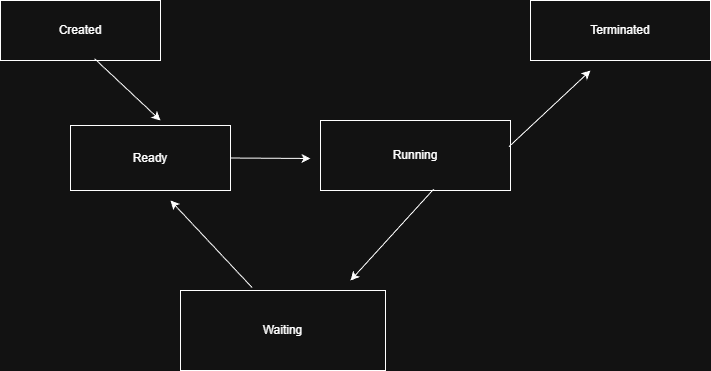
Let’s see the Process Life Cycle now
Creation: A New process is created by an existing process, (if you launched a program, then it will be a new process from the program launcher process). If the Program has created a child process, it will be a child process; we will see how and why the program creates a child process later in the same chapter.
Ready/Running: Process that is being executed by the CPU or in the waiting queue, waiting for the CPU to be available.
Waiting/Sleeping: Process stopped temporarily or waiting for I/O operations, User Input, or any other event, or waiting for a timer.
Stopped: Process is stopped currently because of a User action or a Stop signal
Termination: Process has finished its execution, Kernel cleans up memory and other resources assigned to it.
How Linux Stores the Process (task_struct)
We all know that Linux is written in the C language, so the data structures we will see related to Processes will be in the C language.
It is important to know how Linux represents Processes in memory, so that we can imagine how processes are treated by the Linux Kernel, what their properties are, and how they are moved through different states.
Linux kernel stores Process information in a data structure called task_struct, it is a C structure that stores properties of a process, like Process ID (PID), State, scheduling information, and Pointers to Memory Information.
All task_struct instances are linked together in the global linked list called task list to represent all tasks in memory.
Task_Struct also stores the parent-child relationship of a process, so Kenel can track the process’s parent and child whenever necessary
Can a Program have multiple Processes?
We have already seen that when a program is launched, a new process will be created for that program, so each program will have only one process. The answer is usually that a program will have one process associated with it, but, program may create more processes, and those processes will be child processes of this main process
Why a Program may create a new or child process?
The following reasons a program may create multiple processes
To work in parallel:
The program may create multiple processes to execute complex code in parallel to increase its speed.
The best example of this is Web browsers’ tabs, for each new tab, a new process is created in the Kernel so that more work can be done in parallel.
For Stability: If one process crashes other process should keep running fine. We can take an example of a browser again if one tab crashes, not the entire browser crahses
To run another program: If a Program wants to open or launch another program, then it will create a new process for that.
To handle Multiple Requests(advanced programs like web servers): programs like web servers handled multiple network requests; for that, they create different processes to treat each request as separate and secure.
How Program create a new Process
For creating a new process in Linux, a Program must call the fork() System call, which is an instruction to the kernel to create a new process for the current program
Kernel Processes
So far, we have seen information about Processes that belong to User Programs, but Linux has its own code to execute, Kernel code. Linux Process management model treats Linux code as a Process too.
Like user processes, Kernel Processes are also stored in task_struct and have the same properties as Program Processes
The states of these processes are also the same as the Program processes
Differences are kernel process code runs inside kernel space, not user space (Kernel and User Program space are different in Linux and Linux-like Operating Systems), and these processes can perform I/O operations themselves, because they run in privileged or Kernel Space.
So simple and easy to understand for someone who is a beginner like me to not be scared on systems stuff.